Growth Guides
Teach Neuro Your Business — Why 15 Minutes on Your FAQ Pays Off on Every Chat

Your website has an employee who never sleeps.
Neuro sits on your site around the clock, greeting every visitor, answering questions, collecting leads — at 2pm and 2am.
But here's the thing about any employee, human or AI:
They're only as good as what you've taught them.
This is the guide to your website AI knowledge base — why 15 minutes of teaching is some of the highest-leverage time you'll spend on your business.
What happens when a visitor asks a question
Picture tonight, 11pm. Someone's on your site asking: "Do you handle emergency calls?"
Two possible outcomes:
- Untrained: Neuro answers honestly but generally — and invites them to leave their contact info. Fine. But the visitor wanted an answer now.
- Trained: "Yes — we take emergency calls until midnight on weekdays. Call us at…" The visitor calls. That's a customer.
The difference isn't the AI. It's whether you taught it your real answers.
An answered question at 11pm is a booked job at 9am.
Neuro never guesses — that's why teaching matters
Neuro has a strict rule: it only states facts it's been given. It will never invent your prices, your hours, or your policies.
That's exactly what you want — no made-up promises to walk back.
But it also means every question you haven't answered is a "let me take your contact info" instead of a direct answer. The knowledge base is how you turn those into instant answers.
The 10 questions to teach first
You already know them — they're what people ask on the phone every week:
Your growth partner
A website is the start. Neuro keeps it working.
- Built from your Google or LinkedIn
- Answers visitors, captures leads
- Drafts blog, social and newsletter
- Nothing goes out until you approve it
Rated Excellent on TrustpilotGlobal review platform · 300M+ reviews
- What exactly do you do (and not do)?
- What areas do you serve?
- What are your hours — and do you take emergencies / short-notice bookings?
- Roughly what do things cost, or how do you quote?
- How fast can someone get an appointment?
- Do you take insurance / offer financing / accept card?
- What should a first-time customer expect?
- Do you offer guarantees or warranties?
- How do people reach you fastest?
- What makes you different from the others in town?
Answer those and you've covered the vast majority of real conversations.
How to teach Neuro (15 minutes, from your dashboard)
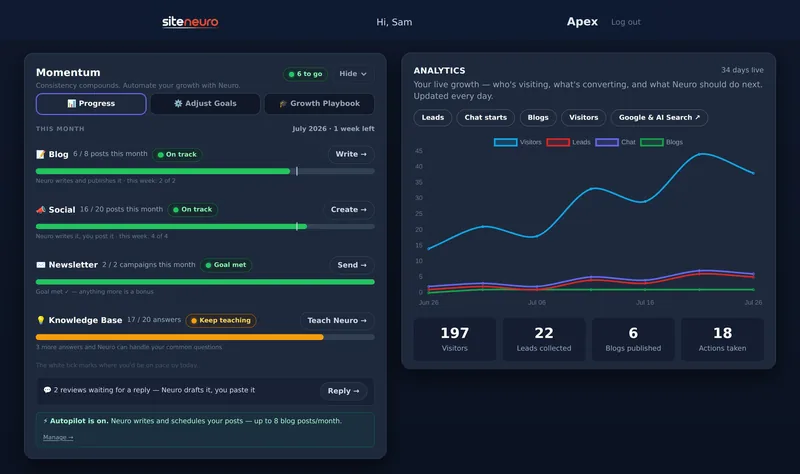
In your owner dashboard, open Knowledge Base:
- Neuro suggests the questions customers in your line of business actually ask — so you're not starting blank.
- Type your answer the way you'd say it on the phone. Two sentences beats a paragraph.
- Save. Neuro uses it from the very next conversation.
And there's a bonus: your saved Q&As can appear in the FAQ section of your site itself — where Google and AI search engines read them. The same 15 minutes improves your chat and your rankings. (More on that in the 2026 SEO & AI Search guide.)
Keep it alive with one habit
Once a month, skim your recent chats in the dashboard. Every question Neuro had to sidestep is a gap.
Add the answer — two minutes — and that question is handled forever.
That's the loop: visitors ask → you teach → Neuro answers the next one instantly. Your night-shift employee gets a little smarter every month.
What's the difference between a knowledge base and an FAQ?
The knowledge base is everything you teach your AI privately — it draws on it in conversation. The FAQ is the public list of questions and answers shown on your site. Good tools feed both from the same answers.
Will the AI make things up if it doesn't know an answer?
A well-built one won't. Neuro only states what it's been taught and otherwise offers to take the visitor's contact info, so there are no invented prices or promises.
How long does it take to set up?
The first useful pass takes about 15 minutes — the top 10 questions above. From there, add answers as real chats surface gaps.
Does an FAQ on my website help with SEO?
Yes. Clear question-and-answer content is exactly what Google's rich results and AI search engines quote — an FAQ built from real customer questions works for your rankings, not just your chat.
Ready to put this to work?
Pick how much help you want. Both start with a free look at your site.
Apex Concierge $119/mo
Your website, plus a growth team every week.
- Your site in your inbox within 2 hours
- 30-minute setup call with a specialist
- Answers visitors, captures leads
- Drafts blog, social and newsletter
Essential $39/year
Just the website, done properly.
- Built from your Google or LinkedIn
- Set up for Google and AI search
- Hosting and security included
- Unlimited edits, no extra cost
Rated Excellent on TrustpilotGlobal review platform · 300M+ reviews