AI Search
Can Google and AI Read Your Website? 10 Checks and a Free Checker
AI assistants can't recommend a business they can't read. Ten quick checks show whether yours is readable, and most fixes take minutes.
Can Google and AI read your website? Only if it tells them, in code and in plain words, what you do, where you are and how to reach you.
Most local business websites get that half right.
And half right is where you lose the recommendation to a competitor.
In this guide:
- Why AI search now decides who gets recommended
- What 29 local websites got wrong
- The 10 checks, and how to test each one yourself in minutes
- What to fix first, if you only have an afternoon
- A free Website Checker that runs all 10 checks for you
Short on time? The checker runs all 10 checks on your site in about 20 seconds, scores it out of 100 and tells you the 3 fixes that matter most.
Why "can AI read my website?" is now a sales question
People don't only type "plumber near me" into Google anymore.
They ask ChatGPT, Gemini, Perplexity and Google's AI answers: "Who's the best plumber in Fort Myers?"
Those answers name two or three businesses. Not ten blue links.
If an AI can't work out what your business is, it can't put you on that short list.
AI search is how people find businesses now
People increasingly don't want a list of links. They want the answer.
That shift is moving fast:
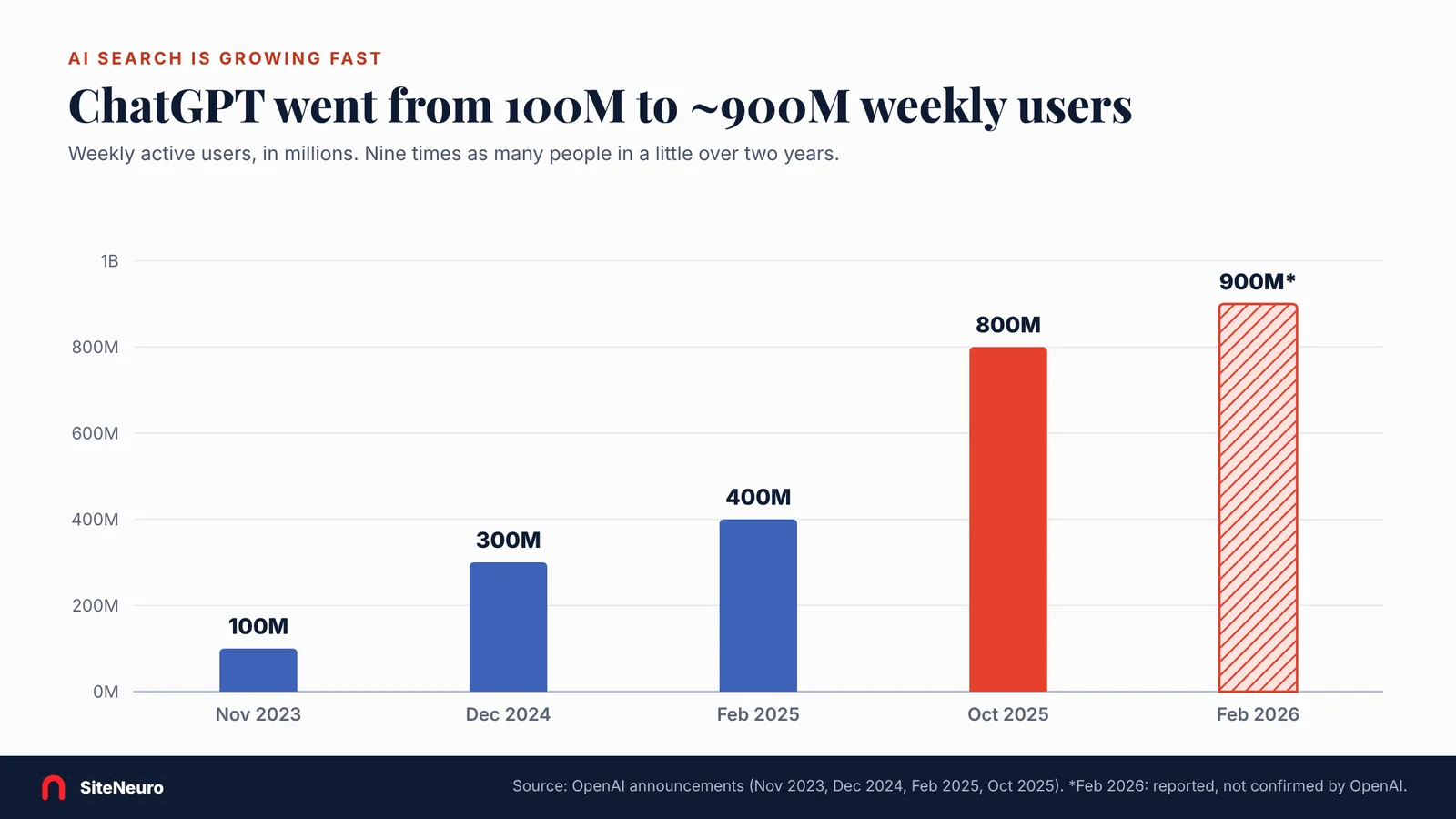
- ChatGPT grew from 100 million weekly users in November 2023 to 800 million in October 2025 (OpenAI), and was reported at about 900 million in early 2026.
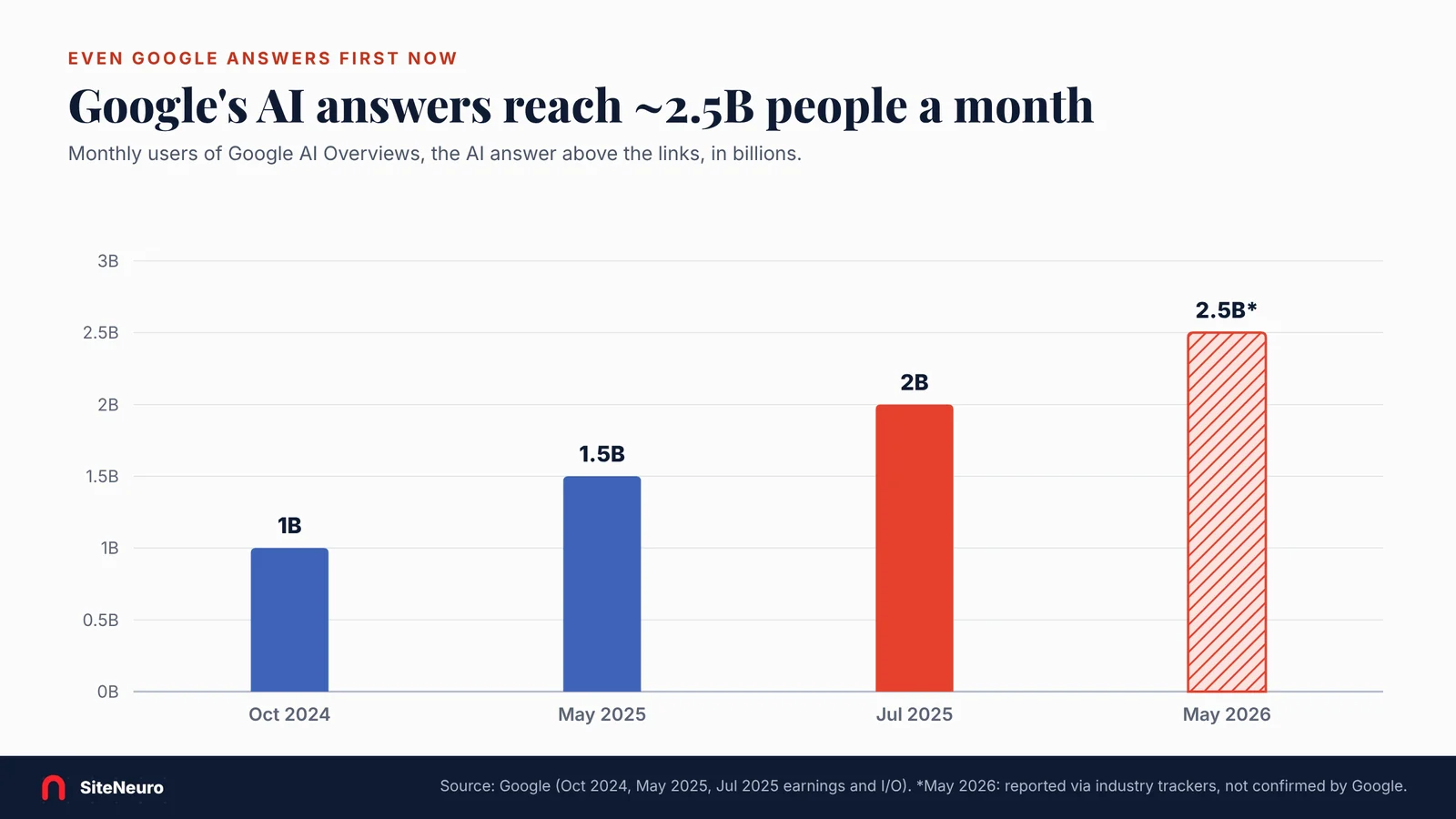
- Google's own AI answers (AI Overviews) reached 2 billion monthly users by July 2025 (Google), up from 1 billion in October 2024.
- About half of US consumers already use AI-powered search on purpose, in a McKinsey survey of 1,927 people (August 2025).
And the forecasts point one way. Gartner predicted traditional search volume would fall about 25% by 2026. Semrush projects AI search visitors will pass traditional search visitors by 2028.
Our estimate for 2030: about half of all searches answered by AI, within a range of roughly 30–65%. That's a SiteNeuro estimate, extended from Semrush's 2028 crossover and eMarketer's forecast that more than 45% of internet users will use AI search by 2030. Treat it as a direction, not a measurement.
Here's the thing: AI doesn't "see" your beautiful homepage photo. It reads text, structure and a few small files. That's what the checks below look at.
There's more on how this differs from classic SEO in AEO vs SEO.
What a recent test of local websites found
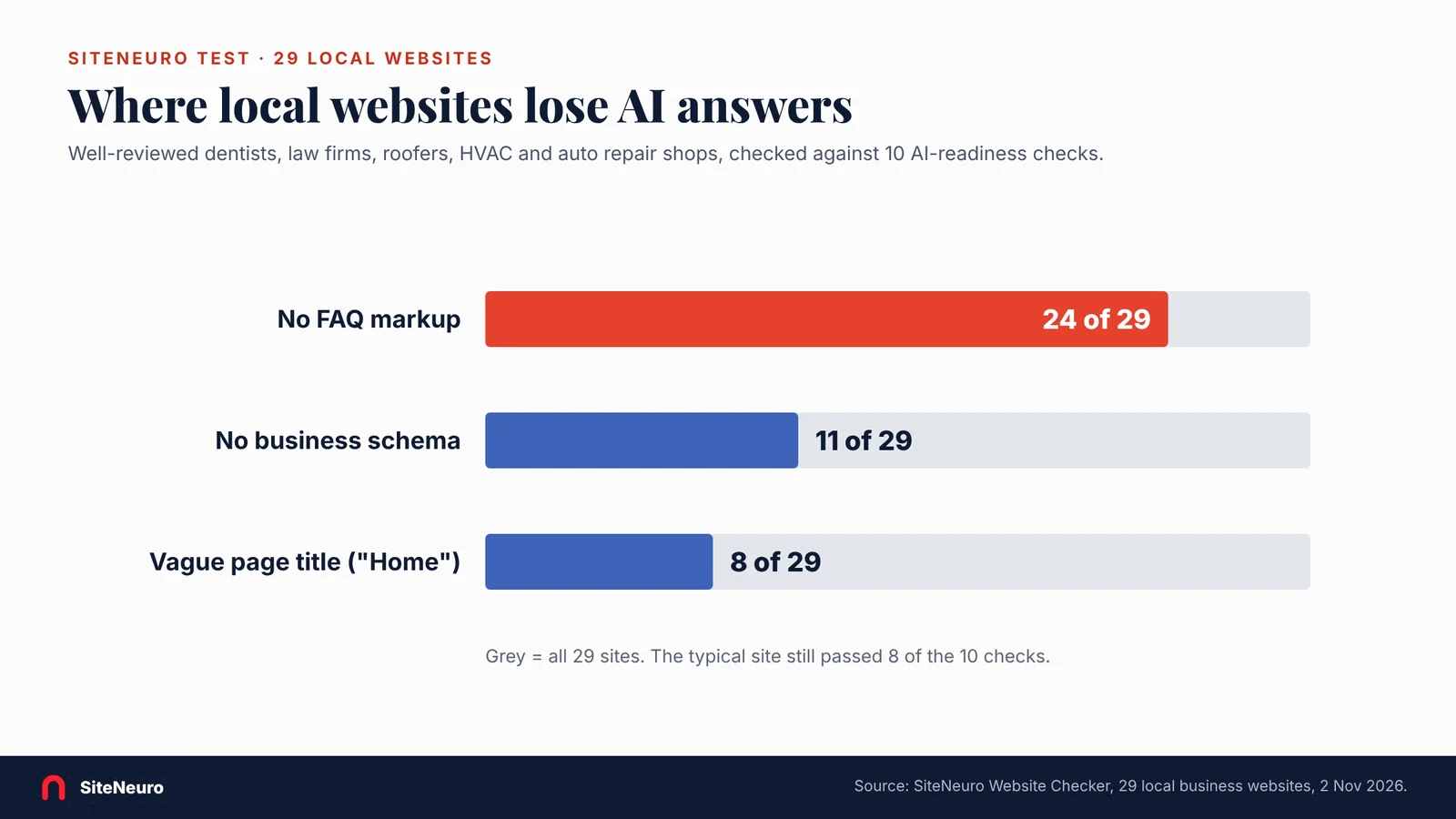
SiteNeuro ran these checks on 29 well-reviewed local business websites in November 2026: dentists, law firms, roofers, HVAC and auto repair shops.
- The middle site passed 8 of 10. Not bad.
- 24 of 29 had no FAQ markup, the easiest thing for an AI answer to quote.
- 11 of 29 had no business schema, the code that tells search engines what you are and where.
- 8 of 29 had a vague page title, like "Home".
So the typical site is close.
But the gaps sit exactly where AI answers get their facts.
The 10 checks (and how to test each one yourself)
You can do every one of these in your browser, no tools needed.
1. Business schema: does your site say what you are, in code?
Why it matters: schema.org "LocalBusiness" markup tells Google and AI tools your business type, address, phone and hours in a format they don't have to guess at.
Check it: open your homepage, right-click, choose "View page source", and search (Ctrl+F) for `LocalBusiness` or your type, like `Dentist` or `Plumber`.
Fix: add LocalBusiness JSON-LD with your name, address, phone, hours and category. Many website builders have a setting or plugin for it.
2. Phone number on the page
Why it matters: AI answers and phone users both need a number they can read and tap.
Check it: on your phone, can you tap your number from the first screen?
Fix: put it in the header and footer as text, linked with `tel:`.
3. Address on the page
Why it matters: "near me" answers match businesses by location. A map image doesn't count, because it has no readable text.
Check it: is your street address (or service area) written out on the page?
Fix: add it as text in the footer and on a contact section.
4. A descriptive page title
Why it matters: the title is the headline Google and AI tools show for you.
Check it: look at your browser tab. "Home" or "Welcome" is a miss.
Fix: 15–70 characters with what you do and where: "Emergency Plumber in Fort Myers | Bay Plumbing".
5. Clear headings
Why it matters: one main heading plus section headings tell readers and machines what each part of the page is about.
Fix: exactly one H1 that says what you do and where, then an H2 for each section: services, reviews, contact.
6. FAQ markup AI answers can quote
Why it matters: questions and answers in FAQ markup are the easiest content for an AI answer to lift.
Fix: add an FAQ section answering the questions customers ask on the phone ("Do you offer weekend appointments?"), marked up as FAQPage.
The quickest AI-search win for most local sites: an FAQ section with real customer questions.
7. AI crawlers allowed in robots.txt
Why it matters: if robots.txt blocks an AI crawler, that tool can't read your site at all.
Check it: open `yourwebsite.com/robots.txt`. Look for these names under `User-agent`: GPTBot and OAI-SearchBot (OpenAI), PerplexityBot, ClaudeBot (Anthropic) and Google-Extended (Google's AI models). A `Disallow: /` under any of them blocks it.
Fix: remove the block, unless you're blocking on purpose. No robots.txt at all means everyone is allowed.
8. Secure HTTPS
Why it matters: browsers warn visitors away from sites without a valid certificate.
Check it: is there a padlock in the address bar, with no warning?
Fix: turn on HTTPS (free with most hosts) and redirect `http://` to `https://`.
9. A mobile viewport
Why it matters: without it, phones show a shrunken desktop page, and most local searches happen on phones.
Fix: your page needs `<meta name="viewport" content="width=device-width, initial-scale=1">`. Any modern builder adds it.
10. An llms.txt file (nice to have)
Why it matters: llms.txt is a new, plain-text summary of your site written for AI tools.
Be honest with yourself about this one: it's a proposed convention, and no major AI search engine has confirmed it reads it yet.
Fix: if it takes you 15 minutes, add `/llms.txt` with your name, what you do, where, your hours and phone, and your key pages. If not, do checks 1–9 first.
Or run all 10 in 20 seconds
Doing this by hand takes about half an hour. The free checker does it in about 20 seconds.
Enter your web address at siteneuro.com/website-score and you get:
- A website score out of 100 on a fixed 7-criterion rubric: mobile, speed, design, content, calls to action, SEO basics, overall experience. The same site gets the same score each time, so you can re-check after you fix things.
- All 10 AI-readiness checks, each marked pass or fail, with what to change
- Your top 3 fixes, in plain words, most important first
- How you compare with 451 well-reviewed local business websites, overall and in your industry
It's free, and a copy of the result lands in your inbox.
Passing all 10 checks doesn't guarantee a recommendation
Let's be straight about this.
The checks make sure AI tools can read and understand your business.
Whether they recommend you also depends on:
- Your reviews: how many, how recent, what they say
- Your Google Business Profile: categories, photos, posts (here's the full checklist)
- What other sites say about you: directories, local news, partners
Think of the 10 checks as making sure you're in the running.
Your reputation decides the race.
What to fix first
If you only have an afternoon:
- Title and H1 (5 minutes): what you do + where.
- Phone and address as text (10 minutes): header and footer.
- FAQ section (an hour): 6–8 real customer questions.
- Business schema (an hour, or a plugin): name, address, phone, hours, category.
- robots.txt (5 minutes): make sure the AI crawlers aren't blocked.
Then ask ChatGPT to review your site like a customer would, and see if it now gets your business right.
Want it done for you?
- Check your site free: the Website Checker runs all 10 checks and gives you a score out of 100 in about 20 seconds.
- Need more than fixes? SiteNeuro builds your business website from your real details and reviews in about a minute, with schema, FAQ and clear titles built in. See your own website free, no card needed.
- Building with AI yourself? The founder's book, Build Your AI Platform, shows the method used to build SiteNeuro, for people who don't code. Chapter 1 is free.
Straight answers
Can AI read my website?
How do I check if ChatGPT can see my website?
Does llms.txt help my website show up in AI answers?
What is a good website score for a small business?
Does Google-Extended affect my Google ranking?
Will passing all 10 checks get me recommended by AI?
Ready to put this to work?
Pick how much help you want. Both start with a free look at your site.
Essential $39/year
Just the website, done properly.
- Built from your Google or LinkedIn
- Set up for Google and AI search
- Hosting and security included
- Unlimited edits, no extra cost
Apex Concierge $119/mo
Your website, plus a growth team every week.
- Your site in your inbox within 2 hours
- 30-minute setup call with a specialist
- Answers visitors, captures leads
- Drafts blog, social and newsletter
Rated Excellent on TrustpilotGlobal review platform · 300M+ reviews