Growth Guides
How to Reply to Google Reviews: Examples for Every Kind of Review
Every reply to a review is read by future customers, not just the reviewer. Here's how to reply well in two minutes, with examples you can copy.
How do you reply to a Google review? Thank the reviewer by name, mention one specific detail from their visit, and invite them back.
For a negative review, thank them, own what you can in one line, and take the conversation offline.
Keep every reply to two or three sentences, and reply to all of them, good and bad.
Below are copy-ready examples for every kind of review, plus why replying matters more than most owners think.
Here's a stat hiding in plain sight.
Open the Maps listing of the top-ranked business in your category. Then open the one ranked tenth.
Almost every time, the top one has something the other doesn't: the owner replies to reviews.
That's not a coincidence. This is the guide to why you should reply to Google reviews — every single one — and how to do it without it eating your evenings.
Reviews are your local ranking engine
Google decides the Maps "local pack" — the three businesses shown first — largely on signals of trust and activity:
- Fresh reviews coming in steadily
- Your replies to them — proof of an engaged, operating business
- Your rating, your profile completeness, your website
A strong review and rating count for less if there's nowhere for a searcher to click through to — see why reviews aren't enough without a website to send people to.
You can't write your own reviews. But replies? Those are 100% in your control — and Google explicitly recommends them.
Every reply is a signal to Google — and a message to the hundred fence-sitters reading it.
The real audience isn't the reviewer
Here's what changes how you write replies: the reviewer already made up their mind. The person you're writing for is the next customer scrolling your reviews, deciding whether to call.
They're reading for one thing: what happens if something goes wrong with this business?
- A warm reply to a happy review says "this owner notices."
- A calm, generous reply to an angry review says "this owner fixes things."
Which means a bad review with a great reply can win you more customers than a five-star review with none.
How to reply (the 3-line formula)
For a good review:
- Thank them by name.
- Mention one specific detail from their visit.
- Invite them back.
For a hard review:
- Thank them for the feedback — no defensiveness.
- Own what's ownable, briefly. Never argue, never share details of their situation publicly.
- Take it offline: "Call us — we'd like to make it right."
Three lines. Every time. The hardest part is doing it consistently, at 9pm, after a long day — which is exactly where most owners quit.
Where to reply: step by step
Yes, you can reply to every Google review, as long as you manage the business's Google Business Profile.
Your growth partner
A website is the start. Neuro keeps it working.
- Built from your Google or LinkedIn
- Answers visitors, captures leads
- Drafts blog, social and newsletter
- Nothing goes out until you approve it
Rated Excellent on TrustpilotGlobal review platform · 300M+ reviews
Google's own steps:
- Go to your Business Profile. Search your business name on Google while signed in, or open business.google.com.
- Select "Read reviews".
- Next to the review, select "Reply".
- Type your reply in the box.
- Select "Reply" to post it.
A few things owners don't expect:
- Replies are checked before they appear. Google reviews them against its content policies. That usually takes up to 10 minutes, but it can take up to 30 days.
- The reviewer is notified when you reply, and the reply shows as coming from your business, not your personal name.
- You can edit or delete a reply later: under your reply, select Edit (then Update) or Delete.
Google review reply examples you can copy
Swap the parts in [brackets] for real details. A reply that names something specific always beats a generic one.
A 5-star review with details:
"Thanks so much, [Name]! We're glad the [service] went smoothly and that [detail they mentioned] made a difference. See you next time."
A 5-star review with no text:
"Thank you for the five stars, [Name]! We really appreciate you taking a moment to rate us."
A 4-star review with a small complaint:
"Thanks for the kind words, [Name], and for the honest note about [issue]. We're already looking at it, so your next visit should be even smoother."
A negative review:
"[Name], thank you for telling us about this. We're sorry [the issue] fell short of what you expected. Please call us at [phone] so we can make it right."
A review that seems unfair or fake:
"Thanks for the feedback. We can't find a record of this visit, but we'd like to understand what happened. Please contact us at [phone or email]."
Then report it to Google from your Business Profile if it breaks Google's review policies.
A review for a sensitive business (healthcare, legal, financial):
"Thank you for your feedback. We take every comment seriously and would welcome the chance to talk. Please call our office at [phone]."
Notice what that last one doesn't do: it never confirms the person is a client. Privacy rules can apply in these fields, so keep replies general.
How NeuroReply keeps you consistent
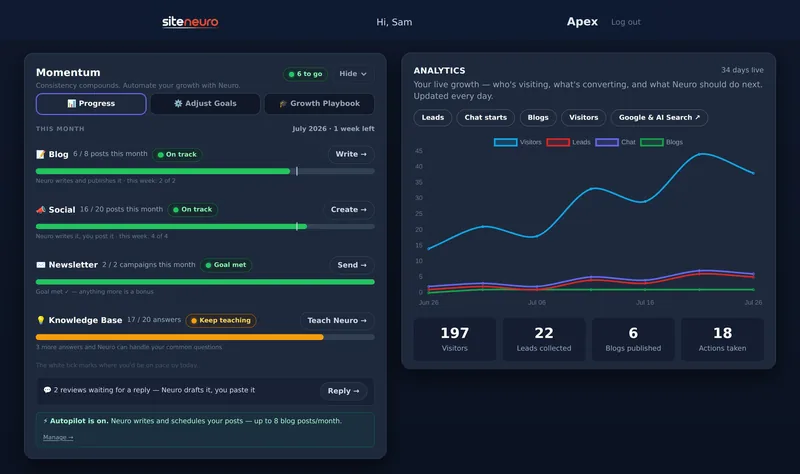
NeuroReply (on Neural and Apex plans, for local businesses) lives in your owner dashboard:
- Your Google reviews appear in your Reviews inbox.
- Neuro drafts a reply for each — warm for the happy ones, careful and de-escalating for the tough ones.
- You review, tweak if you like, then copy & paste it to Google.
On Apex, Neuro auto-drafts a reply for every new review as it arrives — your only job is approving.
The drafts are careful where it counts: low-star reviews always get the soft, take-it-offline tone, and sensitive businesses never confirm who is or isn't a client.
The habit that compounds
Pair replies with fresh reviews and you have the whole engine:
- Ask 3 recent happy customers for a review each month — in person or with a review-request email. (Here's how to get more Google reviews.)
- Reply to every review within a few days — all of them, not just the good ones.
Six months of that, consistently, is how businesses climb into the local pack — and stay there.
Can you reply to a Google review?
Yes. Anyone who manages the business's Google Business Profile can reply to any review: open the profile, select "Read reviews", then "Reply" next to the review.
Why isn't my reply to a Google review showing?
Google checks replies against its content policies before they go public. That usually takes up to 10 minutes but can take up to 30 days. If a reply isn't approved, Google asks you to edit it.
Do replies to Google reviews really affect ranking?
Google's own tips for improving your local ranking include managing and responding to reviews, noting that replies show you value your customers. Beyond ranking, replies visibly influence the people reading them.
Should I reply to old reviews?
Yes — start with the most recent and work back. A burst of thoughtful replies signals an engaged business, and reviewers get notified, which sometimes revives old customers.
How do I handle a review that's unfair or fake?
Reply calmly for the audience ("We have no record of this visit — please contact us"), and report it to Google through your Business Profile. Never argue in the thread.
Should I reply to reviews that have no text?
Yes. A short thank-you is enough. It shows every customer that you notice, and it keeps your reply rate consistent.
Can I use the same reply for every review?
It's better not to. Identical replies look automated to readers. Changing one detail per reply, like their name and what they bought, takes seconds and reads as genuine.
How fast should I reply?
Within a week is fine; within a day or two is better. Consistency over months matters far more than speed on any single review.
Ready to put this to work?
Pick how much help you want. Both start with a free look at your site.
Apex Concierge $119/mo
Your website, plus a growth team every week.
- Your site in your inbox within 2 hours
- 30-minute setup call with a specialist
- Answers visitors, captures leads
- Drafts blog, social and newsletter
Essential $39/year
Just the website, done properly.
- Built from your Google or LinkedIn
- Set up for Google and AI search
- Hosting and security included
- Unlimited edits, no extra cost
Rated Excellent on TrustpilotGlobal review platform · 300M+ reviews